Contents
- What data can you scrape from Idealista?
- Why does Idealista return a 403 to Python requests?
- What DataDome checks
- Your options for getting past DataDome
- Set up the project
- Step 1: Build the Idealista search URL
- Step 2: Fetch pages without getting blocked
- Step 3: Parse the listing cards
- Step 4: Follow pagination
- How do you get more than 1,800 listings from one search?
- Step 5: Scrape each listing page
- Step 6: Get the advertiser's phone number
- Step 7: Save the results to CSV and JSON
- How fast can you scrape Idealista without getting blocked?
- The complete Idealista scraper
- How much does it cost to scrape Idealista?
- Scrape Idealista without managing DataDome
To scrape Idealista with Python, fetch each search page, read the listing cards with BeautifulSoup, follow the
pagina-N.htm links, then open every /inmueble/<id>/ page for the full details. Plain requests gets a 403
from DataDome, so the fetching step needs a client that Idealista accepts.
This guide builds a working scraper in about 190 lines of Python. It collects search results, full listing details and the advertiser's phone number, and saves everything to CSV and JSON. Every selector and URL below was checked against the live site on November 25, 2026.
What you will have at the end:
- A search crawler that follows pagination and handles the 1,800 result limit
- A listing parser for price, price per m², features, description, photos and advertiser
- Agency phone numbers from the endpoint behind the "Ver teléfono" button
- A CSV and a JSON file of the results, plus the complete script
What data can you scrape from Idealista?
You can scrape everything a visitor sees without logging in: the search result cards, the full listing page and the number behind the phone button for most advertisers. The cards give you a quick overview of 30 listings per request. The listing page gives you the details.
| Source | Fields |
|---|---|
| Search result card | Listing ID, title, URL, price, rooms, size in m², floor, short description |
| Listing page | Title, neighbourhood, price, price per m², full feature list (bathrooms, year built, heating, energy rating), description, photos, advertiser name and type |
| Phone endpoint | Advertiser phone number (agencies and developers, plus private sellers who show it publicly) |
Search cards are cheap to collect: one request returns 30 listings. Open the listing pages only for the listings you need, such as new ones since your last run.
Why does Idealista return a 403 to Python requests?
Idealista sits behind DataDome, an anti-bot service that scores every request before the page loads. A Python request fails that check at the network level, so even perfect browser headers get a 403 challenge page instead of listings.
Here is the request most tutorials start with:
import requests

url = "https://www.idealista.com/venta-viviendas/madrid-madrid/"
headers = {
    "User-Agent": "Mozilla/5.0 (Windows NT 10.0; Win64; x64) AppleWebKit/537.36 "
                  "(KHTML, like Gecko) Chrome/131.0.0.0 Safari/537.36",
    "Accept": "text/html,application/xhtml+xml,application/xml;q=0.9,*/*;q=0.8",
    "Accept-Language": "es-ES,es;q=0.9,en;q=0.8",
}

r = requests.get(url, headers=headers, timeout=30)
print("Status:", r.status_code)
print("Server:", r.headers.get("server"))
print("x-datadome:", r.headers.get("x-datadome"))
print("Challenge page:", "captcha-delivery.com" in r.text)
And here is what Idealista sends back:
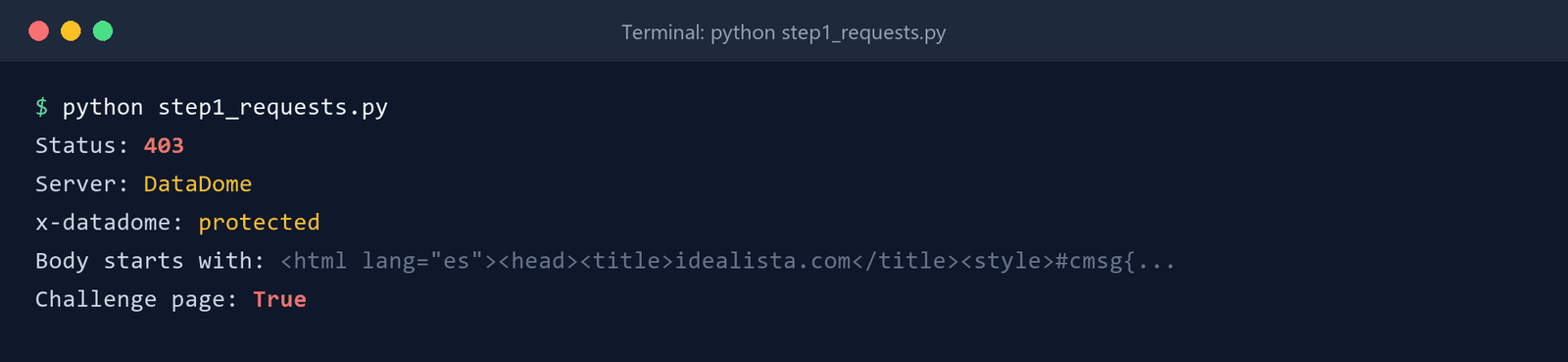
We sent 5 requests with requests and 5 with curl_cffi impersonating Chrome. All 10 got a 403 with
Server: DataDome. A real browser often does not get through either. When we tested in November 2026,
Idealista showed a normal Chrome window the DataDome slider on its first visit, before a single listing
loaded. DataDome changes these rules often, so what you see can differ from one week to the next:

What DataDome checks
DataDome looks at several signals together, so fixing one of them is not enough:
- The network fingerprint. How the TLS and HTTP/2 connection is set up identifies the client. Python's default stack is easy to tell apart from Chrome.
- A JavaScript check. In a browser, DataDome runs a script that inspects the device and the browser. A client without JavaScript cannot pass it.
- The IP address. Datacenter IPs start with a poor score. In our tests a clean home IP was not enough on Idealista either, so residential proxies alone do not solve it.
- Behaviour. Many fast requests from one visitor, or requests without the cookies a browser would carry, raise the score.
Your options for getting past DataDome
| Approach | What happens on Idealista | Upkeep |
|---|---|---|
requests with browser headers | 403 every time (5 of 5 in our test) | None, but it never works |
curl_cffi with Chrome impersonation | 403 every time (5 of 5 in our test) | Low |
| Headless browser (Playwright, Selenium) with residential proxies | Often gets the slider on the first page, like a normal Chrome window | High: browser patches, proxy costs, a captcha solver |
| A captcha solving service on top | Adds a wait and a fee for every captcha | High |
| A scraping API that handles DataDome | You send the URL and get the page back | None on your side |
This guide uses the last option, with Crawio as the API, because it keeps the scraper code short. If you
run your own browsers instead, only the fetch() function changes. Every parser below stays the same.
Set up the project
You need Python 3.9 or newer and three packages:
pip install requests beautifulsoup4 lxmlCreate a free Crawio account at crawio.com/signup (500 free credits, no card required), copy your API key from the dashboard and keep it in an environment variable:
# macOS and Linux
export CRAWIO_API_KEY="your_api_key"

# Windows PowerShell
$env:CRAWIO_API_KEY="your_api_key"Step 1: Build the Idealista search URL
Idealista puts the operation, the property type and the place in the path. Filters are path segments that
start with con-, sorting is a query parameter, and page numbers are a file name at the end.
| What you want | URL |
|---|---|
| Homes for sale in Madrid | https://www.idealista.com/venta-viviendas/madrid-madrid/ |
| Homes for rent in Valencia | https://www.idealista.com/alquiler-viviendas/valencia-valencia/ |
| Price between 200,000 and 300,000 € | .../madrid-madrid/con-precio-hasta_300000,precio-desde_200000/ |
| Newest listings first | ...?ordenado-por=fecha-publicacion-desc |
| Page 2 of the results | .../madrid-madrid/pagina-2.htm |
| One listing | https://www.idealista.com/inmueble/111822363/ |
The easiest way to get a search URL is to set the filters on idealista.com in your browser and copy the address bar. The scraper follows Idealista's own "Siguiente" link for the next page, so filters and sorting carry over.
Step 2: Fetch pages without getting blocked
fetch() sends the Idealista URL to the API and returns the page's HTML. It returns None for a listing that
no longer exists, and it retries twice with a short wait if a request fails:
import os
import time

import requests

API_URL = "https://api.crawio.com/scrape"
API_KEY = os.environ["CRAWIO_API_KEY"]


def looks_blocked(html):
    """True when the HTML is a DataDome challenge page instead of idealista."""
    return "captcha-delivery.com" in html or "geo.captcha-delivery" in html


def fetch(url, retries=2):
    """Return the page HTML, None for a page that does not exist."""
    for attempt in range(retries + 1):
        r = requests.post(
            API_URL,
            headers={"x-api-key": API_KEY},
            json={"url": url},
            timeout=200,
        )
        if r.status_code == 401:
            raise RuntimeError("Check your CRAWIO_API_KEY")
        if r.status_code == 200:
            data = r.json()
            if data["status"] == 404:
                return None
            if data["status"] == 200 and not looks_blocked(data["body"]):
                return data["body"]
        time.sleep(2 ** attempt)          # 1 s, 2 s, 4 s
    raise RuntimeError(f"Could not fetch {url}")
The API answers with JSON: status is Idealista's own HTTP status and body is the HTML. The
looks_blocked() check matters even with an API. A scraper that saves challenge pages as if they were results
fills your dataset with empty rows, and you only notice weeks later.
Tip: test one URL in the Playground first. It shows the same response the API returns.
Step 3: Parse the listing cards
Every listing on a results page is an <article class="item"> with the listing ID in data-element-id.
Inside it, the title link, the price and the details each have their own class:
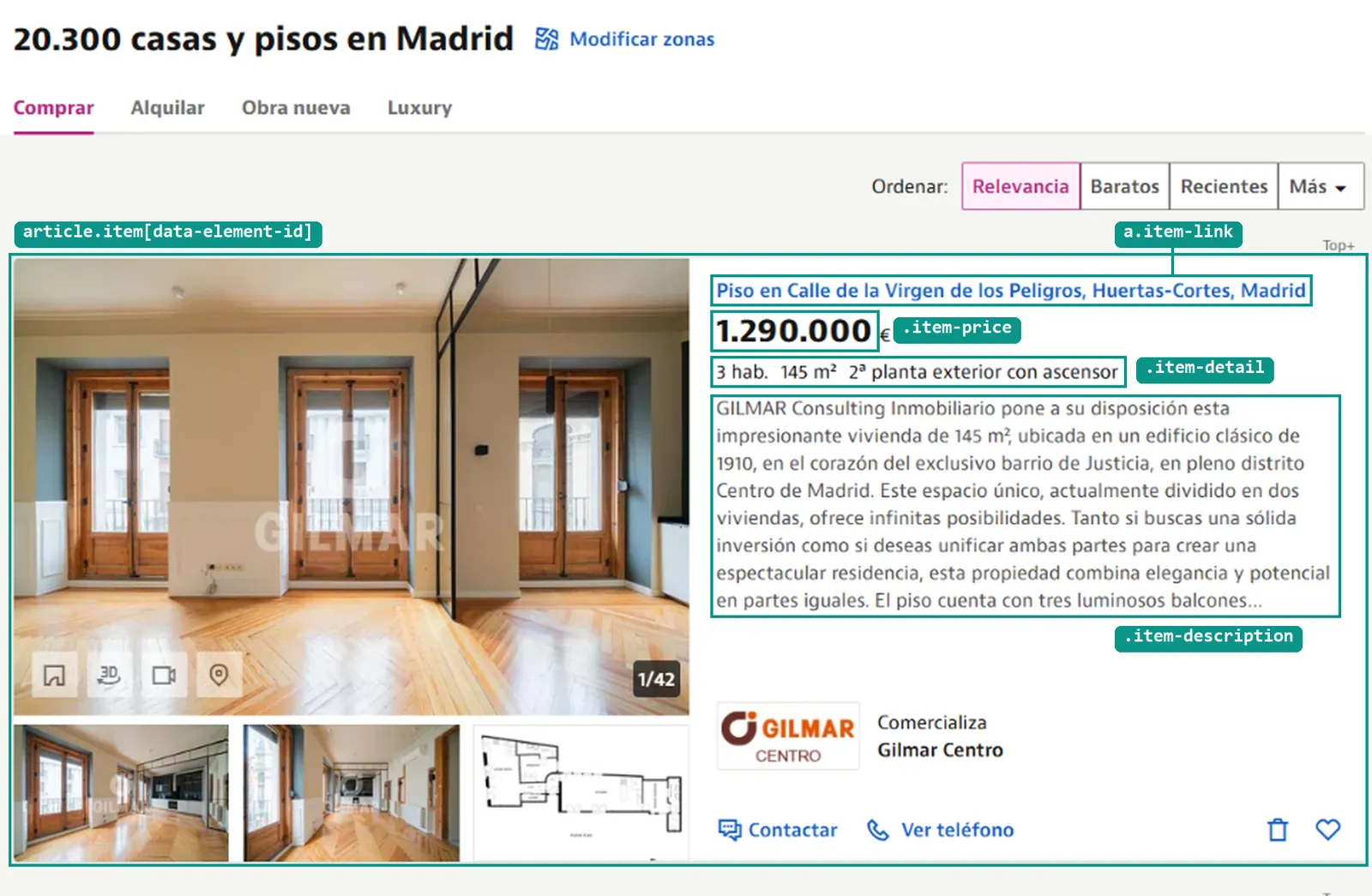
Ads on the results page are <article class="adv"> elements without an ID, so selecting
article.item[data-element-id] skips them. The details line holds rooms (3 hab.), size (145 m²) and the
floor, in that order, but not every listing has all three, so the parser matches each by its unit:
import re
from urllib.parse import urljoin

from bs4 import BeautifulSoup


def to_int(text):
    """'1.290.000 €' -> 1290000"""
    digits = re.sub(r"[^\d]", "", text or "")
    return int(digits) if digits else None


def parse_search_page(html, page_url):
    soup = BeautifulSoup(html, "lxml")
    listings = []
    for card in soup.select("article.item[data-element-id]"):
        link = card.select_one("a.item-link")
        price = card.select_one(".item-price")
        details = [d.get_text(" ", strip=True) for d in card.select(".item-detail")]
        listings.append({
            "id": card["data-element-id"],
            "title": link.get_text(" ", strip=True),
            "url": urljoin(page_url, link["href"]),
            "price": to_int(price.get_text()) if price else None,
            "rooms": next((to_int(d) for d in details if "hab" in d), None),
            "size_m2": next((to_int(d) for d in details if "m²" in d), None),
            "floor": next((d for d in details if "planta" in d.lower()), None),
        })
    next_link = soup.select_one("li.next a")
    next_url = urljoin(page_url, next_link["href"]) if next_link else None
    return listings, next_url
For the first Madrid result, it returns:
{
  "id": "111822363",
  "title": "Piso en Calle de la Virgen de los Peligros, Huertas-Cortes, Madrid",
  "url": "https://www.idealista.com/inmueble/111822363/",
  "price": 1290000,
  "rooms": 3,
  "size_m2": 145,
  "floor": "2ª planta exterior con ascensor"
}Step 4: Follow pagination
crawl_search() keeps fetching the "Siguiente" link until there is none, and drops listings it has already
seen, so a listing that shows up on two pages is kept once:
def crawl_search(start_url, max_pages=60):
    """Follow the 'Siguiente' link page by page. idealista stops at page 60."""
    seen, results, url, page = set(), [], start_url, 0
    while url and page < max_pages:
        html = fetch(url)
        if html is None:
            break
        page += 1
        listings, url = parse_search_page(html, url)
        for item in listings:
            if item["id"] not in seen:
                seen.add(item["id"])
                results.append(item)
        print(f"page {page}: {len(listings)} listings, {len(results)} total")
    return results
To read the total for a search, parse the heading. It says 20.300 casas y pisos en Madrid:
def total_results(html):
    """'20.300 casas y pisos en Madrid' -> 20300"""
    h1 = BeautifulSoup(html, "lxml").select_one("h1#h1-container")
return to_int(h1.get_text().split()[0]) if h1 else NoneHow do you get more than 1,800 listings from one search?
Split the search into smaller searches that each stay under 1,800 results. Idealista shows 30 listings per page and stops at page 60. When we requested page 61 of the Madrid search, we got page 1 again.
Madrid had 20,300 homes for sale on the day we tested, so one search reaches less than a tenth of them. Price bands are the simplest split:
def price_band_url(area_url, low, high):
    """Search URL limited to a price band, to stay under the 1,800 result cap."""
    return f"{area_url.rstrip('/')}/con-precio-hasta_{high},precio-desde_{low}/"


area = "https://www.idealista.com/venta-viviendas/madrid-madrid/"
bands = [(0, 150000), (150000, 200000), (200000, 250000), (250000, 300000)]
everything = {}
for low, high in bands:
    for item in crawl_search(price_band_url(area, low, high)):
        everything[item["id"]] = item        # same listing in two bands is kept once
Check each band's total with total_results() before you crawl it. In our test, the 200,000 to 300,000 € band
in Madrid still held 4,063 listings, so it needs to be split again into 50,000 € bands. Districts work too:
/venta-viviendas/madrid/centro/ returned 2,431 listings, so a busy district also needs a price split.
Step 5: Scrape each listing page
A listing page has the full feature list, the description, the photos and the advertiser. The page carries no structured data, so everything comes from the HTML:
ADVERTISER_TYPES = {"Particular": "private", "Profesional": "agency", "Promotora": "developer"}


def to_number(text):
    """'8.897 €/m²' -> 8897.0 and '6,67 €/m²' -> 6.67 (Spanish separators)"""
    match = re.search(r"[\d.,]+", text or "")
    return float(match.group().replace(".", "").replace(",", ".")) if match else None


def parse_listing(html, url):
    soup = BeautifulSoup(html, "lxml")

    def text(selector):
        node = soup.select_one(selector)
        return node.get_text(" ", strip=True) if node else None

    label = (text(".professional-name") or "").split(" ")[0]   # "Profesional Gilmar Centro"
    photos = sorted(set(re.findall(
        r"https://img\d\.idealista\.com/blur/WEB_DETAIL/0/[^\"'\s]+?\.jpg", html)))
    return {
        "id": re.search(r"(\d+)/?$", url).group(1),
        "url": url,
        "title": text(".main-info__title-main"),
        "location": text(".main-info__title-minor"),
        "price": to_int(text(".info-data-price")),
        "price_per_m2": to_number((text(".squaredmeterprice") or "").split(":")[-1]),
        "features": [li.get_text(" ", strip=True)
                     for li in soup.select(".details-property_features li")],
        "description": text(".comment"),
        "advertiser": text(".advertiser-name"),
        "advertiser_type": ADVERTISER_TYPES.get(label),
        "photos": photos,
    }
Three details are easy to get wrong:
- Prices use Spanish separators.
1.290.000 €is one million two hundred ninety thousand, and a rental's6,00 €/m²is six euros.to_int()handles whole prices andto_number()handles decimals. - The advertiser label starts with the type.
.professional-namereadsProfesional Gilmar Centro,Particular TomasorPromotora .... The first word tells you if it is an agency, a private seller or a developer. - Features come as text.
.details-property_features lireturns lines such as2 baños,Construido en 1910andCalefacción individual: Gas natural. Keep the list as it is and pull out the fields you need with a regex later, because the order changes between listings.
Step 6: Get the advertiser's phone number
The phone number is not in the listing HTML. When a visitor clicks "Ver teléfono", the page loads it from a small JSON endpoint, and you can request the same endpoint:
import json

BASE = "https://www.idealista.com"


def get_phone(listing_id):
    """The advertiser's number, or None when idealista asks for a login."""
    url = f"{BASE}/es/ajax/ads/{listing_id}/contact-phones"
    page_headers = {                     # what idealista's own page sends with this call
        "X-Requested-With": "XMLHttpRequest",
        "Accept": "application/json, text/javascript, */*; q=0.01",
        "Referer": f"{BASE}/inmueble/{listing_id}/",
    }
    r = requests.post(API_URL, headers={"x-api-key": API_KEY},
                      json={"url": url, "headers": page_headers}, timeout=200)
    if r.status_code != 200 or r.json()["status"] != 200:
        return None
    phone = json.loads(r.json()["body"]).get("phone1") or {}
    return phone.get("number")
The endpoint answers with both a formatted and an international version of the number:
{"phone1": {"formatted": "910 00 00 00", "number": "+34910000000", "type": null}, "phone2": null}(We replaced the digits of the real number.)
Send the call the way Idealista's own page does. When a visitor clicks the button, the page requests this JSON
with X-Requested-With: XMLHttpRequest, a JSON Accept header and the listing page as Referer.
get_phone() sends the same three headers, and the API passes them on. Without them, DataDome started
refusing the phone call in our tests while the listing pages still loaded. With them, every agency and developer
lookup returned a number within about 2 seconds.
All three private sellers (Particular) we tried answered with a 403: their number needs a login. This guide
does not log in, so those listings keep an empty phone field. That is the right default: the data behind a
login is not public. Keep a phone you already have instead of fetching it again for every run.
Warning: phone numbers and names are personal data under the GDPR. Store them only with a lawful reason, never use them for spam, and delete what you do not need.
Step 7: Save the results to CSV and JSON
JSON keeps the feature lists and photo URLs. CSV opens in Excel or Google Sheets. Write both:
import csv


def save(listings, name):
    with open(f"{name}.json", "w", encoding="utf-8") as f:
        json.dump(listings, f, ensure_ascii=False, indent=2)
    columns = ["id", "title", "location", "price", "price_per_m2",
               "advertiser", "advertiser_type", "phone", "url"]
    with open(f"{name}.csv", "w", newline="", encoding="utf-8") as f:
        writer = csv.DictWriter(f, fieldnames=columns, extrasaction="ignore")
        writer.writeheader()
        writer.writerows(listings)
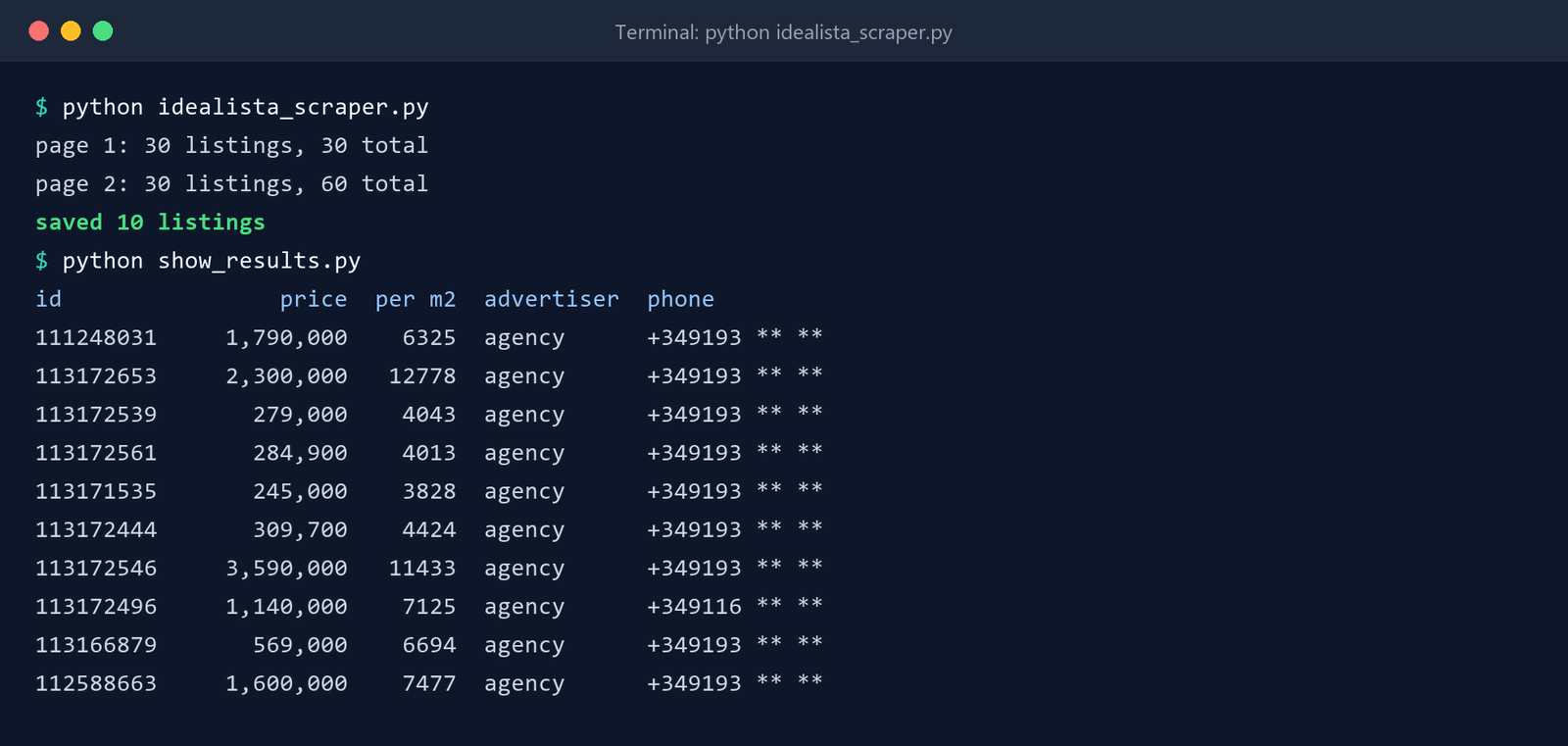
To check a run, print a short table from the JSON file. This show_results.py cuts the phone numbers short on
screen; the files keep them in full:
import json

listings = json.load(open("idealista_madrid.json", encoding="utf-8"))
print(f"{'id':<10} {'price':>12} {'per m2':>7}  {'advertiser':<10}  phone")
for x in listings:
    phone = x["phone"][:7] + " ** **" if x["phone"] else "login only"
    print(f"{x['id']:<10} {x['price']:>12,} {x['price_per_m2'] or 0:>7.0f}  "
          f"{x['advertiser_type'] or '':<10}  {phone}")
Here is our run of the complete script, followed by show_results.py:
How fast can you scrape Idealista without getting blocked?
Through an API, your plan's concurrency sets the speed. The script uses ThreadPoolExecutor(max_workers=2), which matches Crawio's free plan. On a
paid plan, raise max_workers to your plan's number of concurrent requests.
A few habits keep a scraper cheap and reliable:
- Sort by newest and stop early. For a daily job, crawl with
?ordenado-por=fecha-publicacion-descand stop at the first page where every ID is already in your database. - Collect search cards every day, listing pages only when needed. Cards show price changes. Open the listing page for new listings or when the price moves.
- Keep the block check. If you ever switch to your own browsers or proxies,
looks_blocked()stops a bad hour from writing hundreds of empty rows. - Run it on a schedule. A cron job or a systemd timer at night is enough for most price trackers and lead lists.
The complete Idealista scraper
Copy this into idealista_scraper.py, set CRAWIO_API_KEY and run python idealista_scraper.py. It
collects the 60 newest Madrid listings from two search pages, opens the first 10, and saves them to
idealista_madrid.csv and idealista_madrid.json:
"""Scrape idealista search results and listing pages with Python.

    pip install requests beautifulsoup4 lxml
    export CRAWIO_API_KEY=your_key
    python idealista_scraper.py
"""
import csv
import json
import os
import re
import time
from concurrent.futures import ThreadPoolExecutor
from urllib.parse import urljoin

import requests
from bs4 import BeautifulSoup

API_URL = "https://api.crawio.com/scrape"
API_KEY = os.environ["CRAWIO_API_KEY"]
BASE = "https://www.idealista.com"


# ---------------------------------------------------------------- fetching

def looks_blocked(html):
    """True when the HTML is a DataDome challenge page instead of idealista."""
    return "captcha-delivery.com" in html or "geo.captcha-delivery" in html


def fetch(url, retries=2):
    """Return the page HTML, None for a page that does not exist."""
    for attempt in range(retries + 1):
        r = requests.post(
            API_URL,
            headers={"x-api-key": API_KEY},
            json={"url": url},
            timeout=200,
        )
        if r.status_code == 401:
            raise RuntimeError("Check your CRAWIO_API_KEY")
        if r.status_code == 200:
            data = r.json()
            if data["status"] == 404:
                return None
            if data["status"] == 200 and not looks_blocked(data["body"]):
                return data["body"]
        time.sleep(2 ** attempt)          # 1 s, 2 s, 4 s
    raise RuntimeError(f"Could not fetch {url}")


# ---------------------------------------------------------------- search pages

def to_int(text):
    """'1.290.000 €' -> 1290000"""
    digits = re.sub(r"[^\d]", "", text or "")
    return int(digits) if digits else None


def to_number(text):
    """'8.897 €/m²' -> 8897.0 and '6,67 €/m²' -> 6.67 (Spanish separators)"""
    match = re.search(r"[\d.,]+", text or "")
    return float(match.group().replace(".", "").replace(",", ".")) if match else None


def parse_search_page(html, page_url):
    soup = BeautifulSoup(html, "lxml")
    listings = []
    for card in soup.select("article.item[data-element-id]"):
        link = card.select_one("a.item-link")
        price = card.select_one(".item-price")
        details = [d.get_text(" ", strip=True) for d in card.select(".item-detail")]
        listings.append({
            "id": card["data-element-id"],
            "title": link.get_text(" ", strip=True),
            "url": urljoin(page_url, link["href"]),
            "price": to_int(price.get_text()) if price else None,
            "rooms": next((to_int(d) for d in details if "hab" in d), None),
            "size_m2": next((to_int(d) for d in details if "m²" in d), None),
            "floor": next((d for d in details if "planta" in d.lower()), None),
        })
    next_link = soup.select_one("li.next a")
    next_url = urljoin(page_url, next_link["href"]) if next_link else None
    return listings, next_url


def total_results(html):
    """'20.300 casas y pisos en Madrid' -> 20300"""
    h1 = BeautifulSoup(html, "lxml").select_one("h1#h1-container")
    return to_int(h1.get_text().split()[0]) if h1 else None


def crawl_search(start_url, max_pages=60):
    """Follow the 'Siguiente' link page by page. idealista stops at page 60."""
    seen, results, url, page = set(), [], start_url, 0
    while url and page < max_pages:
        html = fetch(url)
        if html is None:
            break
        page += 1
        listings, url = parse_search_page(html, url)
        for item in listings:
            if item["id"] not in seen:
                seen.add(item["id"])
                results.append(item)
        print(f"page {page}: {len(listings)} listings, {len(results)} total")
    return results


def price_band_url(area_url, low, high):
    """Search URL limited to a price band, to stay under the 1,800 result cap."""
    return f"{area_url.rstrip('/')}/con-precio-hasta_{high},precio-desde_{low}/"


# ---------------------------------------------------------------- listing pages

ADVERTISER_TYPES = {"Particular": "private", "Profesional": "agency", "Promotora": "developer"}


def parse_listing(html, url):
    soup = BeautifulSoup(html, "lxml")

    def text(selector):
        node = soup.select_one(selector)
        return node.get_text(" ", strip=True) if node else None

    label = (text(".professional-name") or "").split(" ")[0]   # "Profesional Gilmar Centro"
    photos = sorted(set(re.findall(
        r"https://img\d\.idealista\.com/blur/WEB_DETAIL/0/[^\"'\s]+?\.jpg", html)))
    return {
        "id": re.search(r"(\d+)/?$", url).group(1),
        "url": url,
        "title": text(".main-info__title-main"),
        "location": text(".main-info__title-minor"),
        "price": to_int(text(".info-data-price")),
        "price_per_m2": to_number((text(".squaredmeterprice") or "").split(":")[-1]),
        "features": [li.get_text(" ", strip=True)
                     for li in soup.select(".details-property_features li")],
        "description": text(".comment"),
        "advertiser": text(".advertiser-name"),
        "advertiser_type": ADVERTISER_TYPES.get(label),
        "photos": photos,
    }


def get_phone(listing_id):
    """The advertiser's number, or None when idealista asks for a login."""
    url = f"{BASE}/es/ajax/ads/{listing_id}/contact-phones"
    page_headers = {                     # what idealista's own page sends with this call
        "X-Requested-With": "XMLHttpRequest",
        "Accept": "application/json, text/javascript, */*; q=0.01",
        "Referer": f"{BASE}/inmueble/{listing_id}/",
    }
    r = requests.post(API_URL, headers={"x-api-key": API_KEY},
                      json={"url": url, "headers": page_headers}, timeout=200)
    if r.status_code != 200 or r.json()["status"] != 200:
        return None
    phone = json.loads(r.json()["body"]).get("phone1") or {}
    return phone.get("number")


def scrape_listing(url):
    html = fetch(url)
    if html is None:
        return None
    listing = parse_listing(html, url)
    listing["phone"] = get_phone(listing["id"])
    return listing


# ---------------------------------------------------------------- saving

def save(listings, name):
    with open(f"{name}.json", "w", encoding="utf-8") as f:
        json.dump(listings, f, ensure_ascii=False, indent=2)
    columns = ["id", "title", "location", "price", "price_per_m2",
               "advertiser", "advertiser_type", "phone", "url"]
    with open(f"{name}.csv", "w", newline="", encoding="utf-8") as f:
        writer = csv.DictWriter(f, fieldnames=columns, extrasaction="ignore")
        writer.writeheader()
        writer.writerows(listings)


if __name__ == "__main__":
    start = f"{BASE}/venta-viviendas/madrid-madrid/?ordenado-por=fecha-publicacion-desc"
    cards = crawl_search(start, max_pages=2)
    with ThreadPoolExecutor(max_workers=2) as pool:   # match your plan's concurrency
        listings = [x for x in pool.map(scrape_listing, [c["url"] for c in cards[:10]]) if x]
    save(listings, "idealista_madrid")
    print(f"saved {len(listings)} listings")
To scrape rentals or another city, change start. To collect a whole city, loop over price bands as shown in
step 4.
How much does it cost to scrape Idealista?
With Crawio, every Idealista request costs 6 credits: a search page, a listing page or a phone lookup. A search page holds 30 listings, so card data costs 0.2 credits per listing. A full listing with its phone number costs about 12 credits.
| What you collect | Requests | Credits |
|---|---|---|
| 30 listings from one search page | 1 | 6 |
| One listing page | 1 | 6 |
| One phone number | 1 | 6 |
| One full listing (its share of a search page, its page and its phone) | about 2 | about 12.2 |
| The example run above: 2 search pages, 10 listings, 10 phone lookups | 22 | up to 132 |
Here is what each plan covers for Idealista alone:
| Plan | Price | Credits | Search pages (30 listings each) | Full listings with phone | Per 1,000 Idealista requests |
|---|---|---|---|---|---|
| Free | $0 | 500, once | 83 | about 40 | |
| Starter | $29 a month | 300,000 | 50,000 | about 24,500 | about $0.58 |
| Growth | $99 a month | 1,500,000 | 250,000 | about 122,900 | about $0.40 |
| Business | $249 a month | 4,000,000 | 666,666 | about 327,800 | about $0.37 |
For example, a daily job that reads 20 search pages of new listings and opens 200 of them with their phones uses 20 × 6 + 200 × 12.2 = 2,560 credits a day, about 77,000 a month. That fits in the Starter plan with room to spare. See pricing for every plan.
The comparison that matters is with building the fetching step yourself. That means paying for residential proxies, running and patching real browsers, paying a captcha service for every slider, and fixing the scraper each time DataDome changes its checks. With Crawio the price per Idealista page is fixed and known before you start, and the upkeep stays on our side.
Scrape Idealista without managing DataDome
The parsing above is the easy part. Keeping the fetching step working is the hard part. DataDome updates its checks, flags IP addresses and adds new challenges, and a scraper that worked last month returns 403s today.
Crawio handles that step. You send the Idealista URL and get the page back, with no proxies, browsers or
captcha solvers to run. Idealista was one of the three hardest sites in our public benchmark,
and Crawio returned every Idealista page in it. The same API works for idealista.it, idealista.pt and any other
site, with the same fetch() function.
Create a free account to get 500 free credits with no card required, try an Idealista URL in the Playground, and run the script above. The API docs cover sessions, countries and every response field.
Frequently asked questions
Does Idealista have an official API?
Idealista runs an API for partners at developers.idealista.com. You apply for access and Idealista decides who gets it and what it covers. For market research, price tracking or lead lists, most teams scrape the public search and listing pages instead, as this guide shows.
Is it legal to scrape Idealista?
Listing data such as prices, sizes and locations is public, and collecting public data is common practice. Names and phone numbers are personal data under the GDPR, so you need a lawful reason to store them and must not use them for spam. Read Idealista's terms, keep your request rate low, and ask a lawyer about your specific use. This article is not legal advice.
Why do I get a 403 when I scrape Idealista with Python?
Idealista is protected by DataDome. DataDome checks the network fingerprint of every request before any page loads, and Python libraries such as requests do not look like a browser at that level. In our tests on November 25, 2026, 10 out of 10 requests from requests and curl_cffi got a 403 with the header Server set to DataDome.
How many listings can one Idealista search return?
At most 1,800. A results page shows 30 listings and Idealista stops at page 60; asking for page 61 sends you back to page 1. To collect more, split the search into price bands or districts that each hold fewer than 1,800 listings, then remove duplicates by listing ID.
Does the same code work for Idealista Italy and Portugal?
The search cards use the same HTML on idealista.it and idealista.pt, so the card parser works unchanged. The URLs differ. Italy uses /vendita-case/milano-milano/ with lista-2.htm for page 2 and /immobile/ for listings. Portugal uses /comprar-casas/lisboa/ with pagina-2 and /imovel/. The code follows the links it finds, so it handles both.
Can I scrape private sellers' phone numbers from Idealista?
Only when Idealista shows the number without a login. Agency and developer numbers came back for every listing in our tests, as long as the request carried the same headers as Idealista's own page. Private sellers keep their number behind a login, and this guide does not log in, so those listings keep an empty phone field.
How much does it cost to scrape Idealista with Crawio?
Each Idealista request costs 6 credits, whether it is a search page, a listing page or a phone lookup. A search page holds 30 listings, so card data costs 0.2 credits per listing, and a full listing with its phone costs about 12 credits. On the Starter plan (29 dollars for 300,000 credits) that is about 58 cents per 1,000 Idealista requests.