Contents
Choosing a scraping API means comparing claims that are hard to compare. Every provider publishes its own success rate, measured its own way, on its own pages. So we ran one test for six APIs at once, on the same pages, and published the method, the raw log and the script.
This post explains how the test worked and what we found. The full results, with every API's numbers, are on the benchmark page.
The rules
We wrote the rules before the run and applied them to every API, Crawio included:
- Fresh pages. No one had requested any of the pages before the test, so no API could answer from a cache.
- Same pages, same time. All six APIs got the same pages within the same half hour (06:32 to 06:59 UTC on September 29, 2026), five requests at a time each.
- A page counts only if it is real. It had to be the full page with the site's actual content. Block pages, captcha pages and empty shells counted as failures, even when the API reported success.
- Each API at its cheapest working setting. Most APIs offer extras such as premium proxies or browser rendering at a higher price. For each site we used the cheapest setting that worked. Crawio has no settings to pick: you send the URL.
- One retry. A failed page got one more try, as a normal script would do.
- Real charges. Cost is what each account was actually charged, checked against every account's balance and billing dashboard.
The sites
Eleven well-known sites, ten of them behind bot protection:
| Real estate | Jobs and reviews | Shopping and travel | Reference |
|---|---|---|---|
| Idealista, Realtor.com, Zillow | Indeed, Glassdoor, G2 | Amazon, eBay, Home Depot, Booking.com | Wikipedia |
Wikipedia is the control: a site without bot protection, where every API should do well, and every API did.
What we found
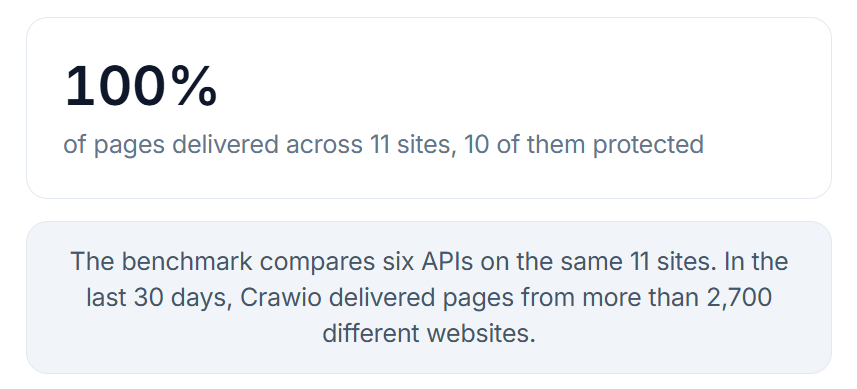
Delivery. Crawio returned every page in the test with the site's real content, across all 11 sites, including the three hardest: Idealista, G2 and Realtor.com.
Cost. We report the cost per 1,000 delivered pages on each API's entry plan, separately for standard and heavily protected pages.
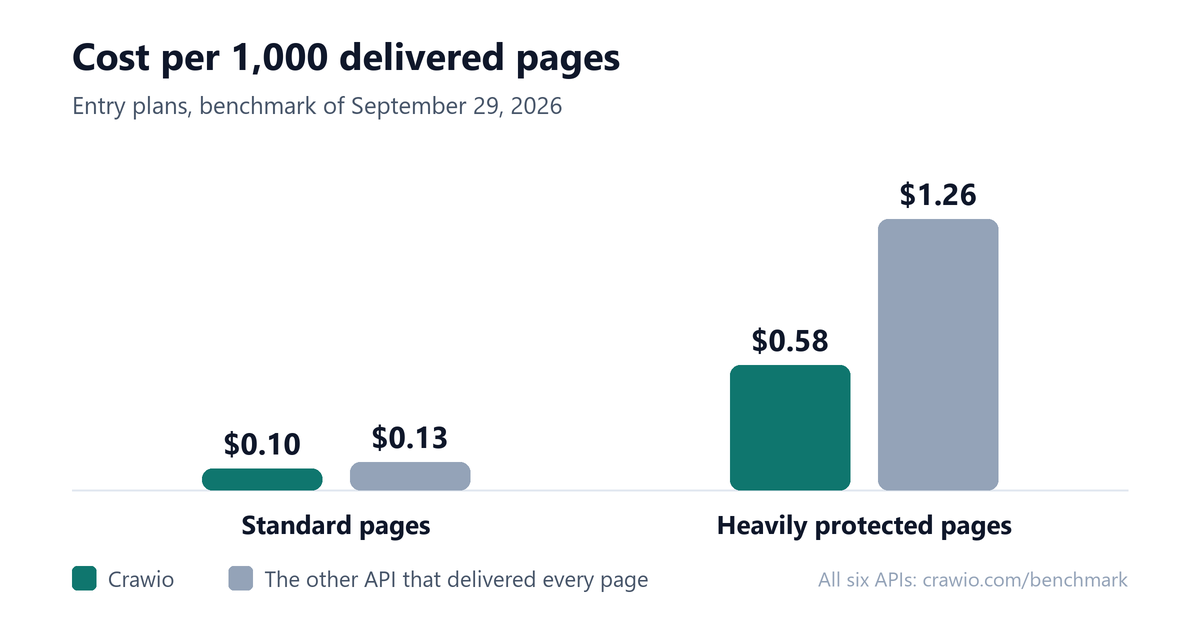
On heavily protected pages, Crawio cost less than half of the only other API that delivered every page: $0.58 against $1.26 per 1,000 pages. On standard pages it was $0.10 against $0.13.
Speed. Crawio's median response time was 5.1 seconds, measured in a second run on October 2, 2026, with the same script and the same pages. The other APIs' times are from September 29.
Reach. Eleven sites is a test, not the whole web. In the 30 days up to September 30, 2026, Crawio delivered pages from more than 2,700 different websites.
How we checked the bill
A low price only matters if the bill matches it. After the run we checked each account's balance and billing dashboard against what its requests should have cost. For Crawio, every request matched its charge, with zero mismatches.
What the test does not show
We publish the limits next to the results:
- Some APIs were tested on free-trial or pay-as-you-go accounts. One trial blocks its strongest setting, which paid plans include, so its results on the hardest sites may differ on a paid plan.
- One API closed some connections without an answer. A rerun of that API alone, ten minutes later, did better; the tables show the main run.
- On one site, another API's cheapest setting worked on the first page and then failed. Its premium setting did better in an earlier run.
- The sample per site is small.
- Crawio's speed comes from the second run, after an engine update.
The benchmark page lists these notes with the API names.
Run it yourself
The test script is public on GitHub under the MIT license, and the raw log of every request is a CSV download. Set the keys of the APIs you want to test as environment variables (the README lists the names), then:
git clone https://github.com/Shah13079/crawio-benchmark
cd crawio-benchmark
pip install -r requirements.txt
python bench.py --set b --dry               # the URLs and each API's account, no page requests
python bench.py --set b --out results/run   # the run itself
python report.py results/run                # the tables
Each run writes a folder with one row per attempt, every saved page with its reply headers (keys removed), and each account's balance before and after.
Choosing an API for your own sites
What we learned applies to any comparison:
- Test your own pages. Results change from site to site, so run the URLs you care about.
- Count delivered pages, not responses. A 200 response can still be a block page. Check that the content you need is there.
- Compare the cost per delivered page on the plan you would actually buy, with standard and protected pages kept apart.
- Check the bill. What you were charged should match what the API reported, request by request.
You can run your own URLs through Crawio in the Playground before writing any code.
Frequently asked questions
Can I see the raw data?
Yes. The raw log of every request is a CSV download on the benchmark page, and the test script is on GitHub under the MIT license, so you can check every number or run the test again with your own keys.
Why fresh pages?
A page that was requested recently may already be cached somewhere, which makes an API look faster and more reliable than it is. Pages nobody had requested before show how an API does on the pages you would actually send.
Why report two prices instead of one?
Heavily protected pages cost more than standard pages with every API in the test. A single average hides the number you will actually pay on the sites that matter, so we report the cost per 1,000 delivered pages for each kind separately.